
Getting Coverage With Insurance Canopy
How Quickly Can I Get Coverage Through Insurance Canopy?
With Insurance Canopy, you can get covered in 10 minutes or less. We specialize in ready-to-buy policies for many industries, so that you can quickly get covered to meet insurance requirements and protect your business. Instant coverage is just a few minutes away, right from your phone.
When Does My Policy Start?
Your policy starts when you want it to. Most business owners choose instant coverage, which means your policy is effective as soon as you pay online. But, you can also select a later start date — whatever works best for your business!
How Do I Purchase a Policy Online?
Purchase a policy online by starting the checkout process. You can get there from any page by clicking the “Get Quote” button in the top right corner.
- Start the purchase process
- Tell us about your business
- Customize your policy with optional add-ons
- Pay and get instant coverage
Our online purchase process makes it simple and fast to get covered without speaking to an agent (unless you want to!).
Can I Buy Coverage for a Future Date?
Yes, you can buy Insurance Canopy coverage up to three months in advance. If you need your policy to start on a future date, you can set that start date during checkout.
Here’s how: when prompted for “Policy Start Date,” click the calendar icon on the right to select the start date for your coverage.
Once your set date rolls around, your coverage will automatically kick in. Feel free to log in to your user dashboard at any time to confirm or make changes.
What Happens After I Purchase a Policy?
After you purchase a policy, you receive a confirmation email with your policy details. You’ll also get access to your online user dashboard, where you can download a copy of your certificate of insurance (COI) and manage your coverage.
Policy Documents and Proof of Insurance
How Do I Download My Certificate of Insurance (COI)?
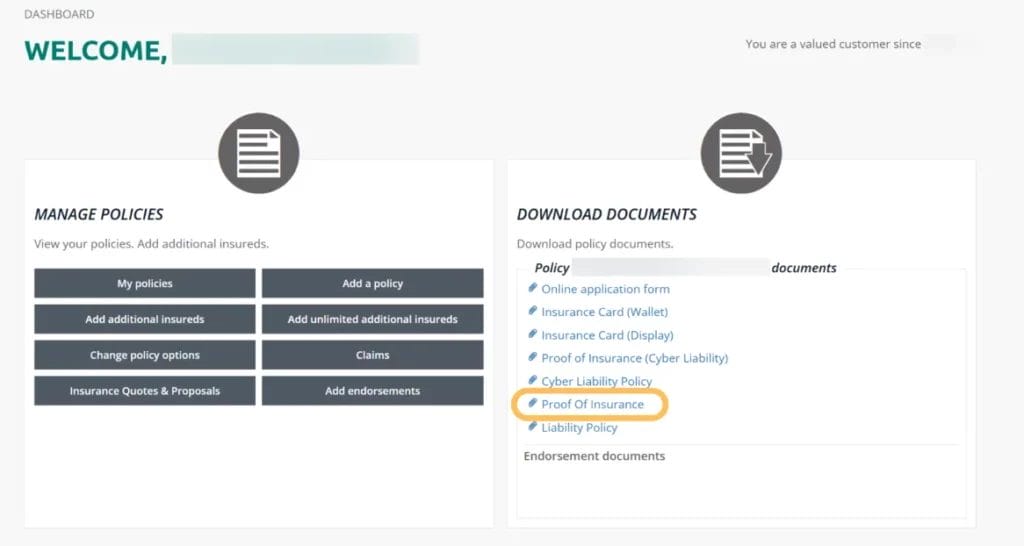
Easily download your certificate of insurance (COI) by logging in to your user dashboard. From your welcome page, click on “Proof of Insurance” under “Download Documents.” Your COI will automatically open! Save it to your device and send it to anyone who needs to verify your coverage.
Here’s what it looks like.
Where Can I Find My Policy Documents?
Find your policy documents in your user dashboard. On the right side of your welcome page, you’ll see a “Download Documents” section listing your official policy, proof of insurance, insurance cards, application form, and endorsement documents, if you have them.
Can I Print My Policy or Request a Physical Copy?
Insurance Canopy is proudly paperless. You can always download and print your policy from your user dashboard — it’s available 24/7. We don’t mail physical copies, which helps keep things fast and environmentally friendly. If you need help accessing your documents, our support team is happy to help!
Why Does My Certificate of Insurance (COI) Need to Match Venue Requirements?
If you need insurance to meet venue or event requirements, your certificate of insurance serves as proof that you have the right coverage, which makes it easier for organizers to work with you.
Make sure the following details are correct:
- Your business name
- The coverage type (for example, general liability insurance)
- The policy effective dates
- The minimum liability limits
- Any required additional insureds
Additional Insureds
What Is an Additional Insured on My Insurance Canopy Policy?
An additional insured is a qualified third party (such as a venue or event organizer) that you add to your policy. This extends your liability coverage to them in case they are pulled into a claim related to your business. It’s a common endorsement (policy edit) for small business insurance policies.
Do I Need an Additional Insured for My Event or Lease?
If an event or landlord requires that you add them as an additional insured on your policy, then typically, yes, you need to add them! Learn more about when to add additional insureds.
How Do I Add an Additional Insured to My New Policy?
Add an additional insured right from the checkout process. Don’t worry — you’ll be prompted to do this before you finalize your purchase! Simply add your additional insured’s name, address, and contact information. After you buy the policy, they’ll get an email notifying them they’ve been added to your policy.
Can I Add an Additional Insured After I Purchase My Policy?
Yes, you can add additional insureds after you purchase a policy! Log in to your online account and click “Add additional insureds” under the “Manage Policies” section to get started.
How Much Does It Cost to Add an Additional Insured?
Many Insurance Canopy policies let you add additional insureds for free! For some industries, there’s a small fee. For example, entertainers can add unlimited additional insureds to their policies for just $10.
Where Can I Confirm Additional Insureds on My Certificate of Insurance (COI)?
Confirm additional insureds have been properly added to your Insurance Canopy certificate of insurance (COI) by checking the “Certificate Holder” section. This is a box near the bottom of the document that lists the person or business (typically an additional insured) who receives a copy of your COI.
Check out the space labeled “13” on the sample below!

Managing Your Policy
How Do I Make Changes to My Policy?
Easily make changes to your policy by logging in to your user dashboard. From the welcome page, navigate to “Change policy options” under “Manage Policies.” Add optional coverages or upgrade liability limits — whatever you need to protect your business! Once you save and pay for the changes, you’re all set.
Can I Update My Mailing or Business Information on My Policy?
Yes! Update your contact information (including your email address, business address, and phone number) by logging in to your user dashboard. Scroll down to “My Profile” and click “Edit personal info.” Make any changes you need and hit the submit button to save.
If you need to update your name or business name, contact us! We’ll help you make those changes to avoid any administrative mixups.

Claims and Support
How Do I File a Claim With Insurance Canopy?
File a claim on your Insurance Canopy online — it just takes a few minutes. Here’s how:
- Log in to your user dashboard
- Navigate to “Manage Policies”
- Click “File a Claim”
- Add your claim information
- Submit your claim
What Happens After I Submit a Claim?
After you submit your claim, our team will confirm we’ve received it. From there, we pass it to the insurance carrier, which is the company that actually makes the decision on your claim. A claims adjuster from that carrier will contact you and walk you through the next steps.
Learn more about what to expect when you file a claim.
Can I Talk to Someone About My Claim?
Yes! We know how stressful claims can be — that’s why our U.S.-based, licensed support team is on standby to help you with submitting your claim. Once you’re assigned a claims adjuster, they’ll be the best person to answer questions about your specific claim.
Billing, Renewals, and Cancellations
Will My Policy Renew Automatically?
Yes, just make sure EZ Renew is toggled on in your user dashboard! Once that’s set, your policy will automatically renew at the end of the policy period, and you’ll have another year of continuous coverage. If you prefer to opt out of auto-renewal, that’s fine, too! We’ll send you an email when it’s time to review and renew your policy.
How Do I Cancel My Policy?
If you don’t need coverage at the moment, you can cancel your policy right from your online dashboard. Here’s how:
- Log in to your account
- Click “My Policies” under “Manage Policies”
- Scroll to “Cancellations” and select “Cancel a Policy”
- Follow the prompts and submit
If you see this section, you’re in the right place.

Will I Get a Refund if I Cancel?
In many cases, cancellations are refunded on a pro-rated basis for any unused premium (excluding fees). This means if you cancel before your policy ends, you may receive a refund for the unused portion of your policy.
Refund eligibility and amounts vary depending on your specific policy and timing (such as how much time has passed since your policy started), so be sure to review your policy details or contact our team if you have questions!
How Do I Update My Payment Information?
Easily update your payment information by logging in to your online dashboard. Scroll to “Payment Profiles” to add your new credit card details. Be sure to double-check that all the numbers and expiration date are correct before saving!
Account Help
I Forgot My Password — What Should I Do?
It happens! If you forgot your password, simply head to the login page and click the “Forgot Password” option. We’ll email you instructions to reset your password.
Why Can’t I See My Policy in My Dashboard?
If your policy isn’t showing up in your dashboard, there are a few common reasons:
- You may be logged into the wrong account
- Your purchase may not have been completed
- There may be a short delay
If you’ve confirmed you’re using the right email and that your payment went through, but it’s still not showing up, our support team can help! Contact us to make sure everything is set up correctly.
Who Do I Contact if Something Isn’t Working?
If your dashboard isn’t working, our team of friendly support representatives would love to assist. Have your policy number ready so we can look you up quickly!
About Insurance Canopy
What Is Insurance Canopy?
Insurance Canopy offers small business insurance that’s easy to buy and manage, all online. Our policies are backed by top-rated carriers and are tailored to your industry, so you can feel confident your coverage is built for the way you work. Learn more about Insurance Canopy.
How Is Insurance Canopy Different From Other Insurance Companies?
Insurance Canopy offers ready-to-buy online policies and tailored coverage solutions. However you want to protect your business — whether through quick, self-serve insurance or a customized plan with support from a licensed agent — we’ve got you covered.
Where Can I Read Customer Reviews?
Insurance Canopy has a nearly five-star rating! Take it from our happy policyholders on our testimonials page.
How Can I Partner With Insurance Canopy?
If you’re looking for a smart, simple way to make sure the people you work with are protected, check out our partnership opportunity. It provides you with automatic additional insured status and gives your clients, vendors, or contractors access to easy, affordable insurance that you can manage from a single dashboard.
How Quickly Can I Get Coverage Through Insurance Canopy?
With Insurance Canopy, you can get covered in 10 minutes or less. We specialize in ready-to-buy policies for many industries, so that you can quickly get covered to meet insurance requirements and protect your business. Instant coverage is just a few minutes away, right from your phone.
When Does My Policy Start?
Your policy starts when you want it to. Most business owners choose instant coverage, which means your policy is effective as soon as you pay online. But, you can also select a later start date — whatever works best for your business!
How Do I Purchase a Policy Online?
Purchase a policy online by starting the checkout process. You can get there from any page by clicking the “Get Quote” button in the top right corner.
- Start the purchase process
- Tell us about your business
- Customize your policy with optional add-ons
- Pay and get instant coverage
Our online purchase process makes it simple and fast to get covered without speaking to an agent (unless you want to!).
Ready to buy your policy now? Click here to get started.
Can I Buy Coverage for a Future Date?
Yes, you can buy Insurance Canopy coverage up to three months in advance. If you need your policy to start on a future date, you can set that start date during checkout.
Here’s how: when prompted for “Policy Start Date,” click the calendar icon on the right to select the start date for your coverage.
Once your set date rolls around, your coverage will automatically kick in. Feel free to log in to your user dashboard at any time to confirm or make changes.
What Happens After I Purchase a Policy?
After you purchase a policy, you receive a confirmation email with your policy details. You’ll also get access to your online user dashboard, where you can download a copy of your certificate of insurance (COI) and manage your coverage.
How Do I Download My Certificate of Insurance (COI)?
Easily download your certificate of insurance (COI) by logging in to your user dashboard. From your welcome page, click on “Proof of Insurance” under “Download Documents.” Your COI will automatically open! Save it to your device and send it to anyone who needs to verify your coverage.
Here’s what it looks like.
Where Can I Find My Policy Documents?
Find your policy documents in your user dashboard. On the right side of your welcome page, you’ll see a “Download Documents” section listing your official policy, proof of insurance, insurance cards, application form, and endorsement documents, if you have them.
Can I Print My Policy or Request a Physical Copy?
Insurance Canopy is proudly paperless. You can always download and print your policy from your user dashboard — it’s available 24/7. We don’t mail physical copies, which helps keep things fast and environmentally friendly. If you need help accessing your documents, our support team is happy to help!
Why Does My Certificate of Insurance (COI) Need to Match Venue Requirements?
If you need insurance to meet venue or event requirements, your certificate of insurance serves as proof that you have the right coverage, which makes it easier for organizers to work with you.
Make sure the following details are correct:
- Your business name
- The coverage type (for example, general liability insurance)
- The policy effective dates
- The minimum liability limits
- Any required additional insureds
What Is an Additional Insured on My Insurance Canopy Policy?
An additional insured is a qualified third party (such as a venue or event organizer) that you add to your policy. This extends your liability coverage to them in case they are pulled into a claim related to your business. It’s a common endorsement (policy edit) for small business insurance policies.
Do I Need an Additional Insured for My Event or Lease?
If an event or landlord requires that you add them as an additional insured on your policy, then typically, yes, you need to add them! Learn more about when to add additional insureds.
How Do I Add an Additional Insured to My New Policy?
Add an additional insured right from the checkout process. Don’t worry — you’ll be prompted to do this before you finalize your purchase! Simply add your additional insured’s name, address, and contact information. After you buy the policy, they’ll get an email notifying them they’ve been added to your policy.
Can I Add an Additional Insured After I Purchase My Policy?
Yes, you can add additional insureds after you purchase a policy! Log in to your online account and click “Add additional insureds” under the “Manage Policies” section to get started.
How Much Does It Cost to Add an Additional Insured?
Many Insurance Canopy policies let you add additional insureds for free! For some industries, there’s a small fee. For example, entertainers can add unlimited additional insureds to their policies for just $10.
Where Can I Confirm Additional Insureds on My Certificate of Insurance (COI)?
Confirm additional insureds have been properly added to your Insurance Canopy certificate of insurance (COI) by checking the “Certificate Holder” section. This is a box near the bottom of the document that lists the person or business (typically an additional insured) who receives a copy of your COI.
Check out the space labeled “13” on the sample below!
How Do I Make Changes to My Policy?
Easily make changes to your policy by logging in to your user dashboard. From the welcome page, navigate to “Change policy options” under “Manage Policies.” Add optional coverages or upgrade liability limits — whatever you need to protect your business! Once you save and pay for the changes, you’re all set.
Can I Update My Mailing or Business Information on My Policy?
Yes! Update your contact information (including your email address, business address, and phone number) by logging in to your user dashboard. Scroll down to “My Profile” and click “Edit personal info.” Make any changes you need and hit the submit button to save.
If you need to update your name or business name, contact us! We’ll help you make those changes to avoid any administrative mixups.
How Do I File a Claim With Insurance Canopy?
File a claim on your Insurance Canopy online — it just takes a few minutes. Here’s how:
- Log in to your user dashboard
- Navigate to “Manage Policies”
- Click “File a Claim”
- Add your claim information
- Submit your claim
What Happens After I Submit a Claim?
After you submit your claim, our team will confirm we’ve received it. From there, we pass it to the insurance carrier, which is the company that actually makes the decision on your claim. A claims adjuster from that carrier will contact you and walk you through the next steps.
Learn more about what to expect when you file a claim.
Can I Talk to Someone About My Claim?
Yes! We know how stressful claims can be — that’s why our U.S.-based, licensed support team is on standby to help you with submitting your claim. Once you’re assigned a claims adjuster, they’ll be the best person to answer questions about your specific claim.
Will My Policy Renew Automatically?
Yes, just make sure EZ Renew is toggled on in your user dashboard! Once that’s set, your policy will automatically renew at the end of the policy period, and you’ll have another year of continuous coverage. If you prefer to opt out of auto-renewal, that’s fine, too! We’ll send you an email when it’s time to review and renew your policy.
How Do I Cancel My Policy?
If you don’t need coverage at the moment, you can cancel your policy right from your online dashboard. Here’s how:
- Log in to your account
- Click “My Policies” under “Manage Policies”
- Scroll to “Cancellations” and select “Cancel a Policy”
- Follow the prompts and submit
If you see this section, you’re in the right place.
Will I Get a Refund if I Cancel?
In many cases, cancellations are refunded on a pro-rated basis for any unused premium (excluding fees). This means if you cancel before your policy ends, you may receive a refund for the unused portion of your policy.
Refund eligibility and amounts vary depending on your specific policy and timing (such as how much time has passed since your policy started), so be sure to review your policy details or contact our team if you have questions!
How Do I Update My Payment Information?
Easily update your payment information by logging in to your online dashboard. Scroll to “Payment Profiles” to add your new credit card details. Be sure to double-check that all the numbers and expiration date are correct before saving!
I Forgot My Password — What Should I Do?
It happens! If you forgot your password, simply head to the login page and click the “Forgot Password” option. We’ll email you instructions to reset your password.
Why Can’t I See My Policy in My Dashboard?
If your policy isn’t showing up in your dashboard, there are a few common reasons:
- You may be logged into the wrong account
- Your purchase may not have been completed
- There may be a short delay
If you’ve confirmed you’re using the right email and that your payment went through, but it’s still not showing up, our support team can help! Contact us to make sure everything is set up correctly.
Who Do I Contact if Something Isn’t Working?
If your dashboard isn’t working, our team of friendly support representatives would love to assist. Have your policy number ready so we can look you up quickly!
What Is Insurance Canopy?
Insurance Canopy offers small business insurance that’s easy to buy and manage, all online. Our policies are backed by top-rated carriers and are tailored to your industry, so you can feel confident your coverage is built for the way you work. Learn more about Insurance Canopy.
How Is Insurance Canopy Different From Other Insurance Companies?
Insurance Canopy offers ready-to-buy online policies and tailored coverage solutions. However you want to protect your business — whether through quick, self-serve insurance or a customized plan with support from a licensed agent — we’ve got you covered.
Where Can I Read Customer Reviews?
Insurance Canopy has a nearly five-star rating! Take it from our happy policyholders on our testimonials page.
How Can I Partner With Insurance Canopy?
If you’re looking for a smart, simple way to make sure the people you work with are protected, check out our partnership opportunity. It provides you with automatic additional insured status and gives your clients, vendors, or contractors access to easy, affordable insurance that you can manage from a single dashboard.